Your Cart is Empty





Sale
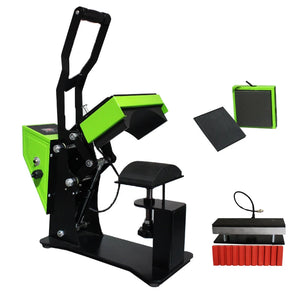
2 in 1 Label Cap Hat Heat Press Machine Auto Open for Cap Printing Automatic Heat Transfer Press Cap
$391.92$715.92
Payment Methods

AUPLEX Focus on Providing ONE-STOP Heat Transfer Products More Than 20 Years
Heat press machine is designed for printing textiles, t-shirts, mouse pads, puzzles, ceramic tiles, sublimation mug, and other flat surfaces items by using the flex, flocking, transfer printing paper, sublimation etc.
2019 New Design cap heat press sticker 12 X12 Transfer Heat Press Machine 10in1 Pen Cap Hat Cap Sublimation heat press
Product Description


How to Set Temp&Time
1.Press on the on / off switch
2.Touch screen Set temperature
3 Touch screen Set time
4.Put objects when the machine has reached the desired temperature, press two start buttons
on left and right side,machine close down, waiting time.
5.When times up, heating plates will rise up automatic, take out printing items.
6.Press green button on left side besides controller to make whole machine lower, and press green button on right side besides controller to make whole machine higher

Quality Assurance

Onvels is synonymous with excellence.Onvels stands for quality.Onvels is synonymous with originality.Onvels is synonymous with effectiveness.Onvels. Excellence is our goal.Onvels committed to the best service ( Always ).

You may also like
Bestsellers
Bestsellers


